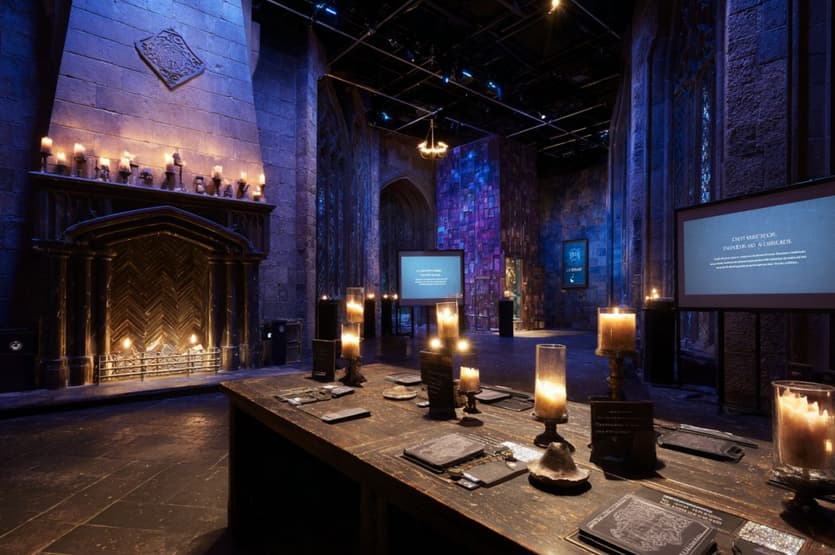
Immersive experiences don’t require theme-park budgets. With today’s consumer hardware and open tools, you can stage a rich, participatory “sorting ceremony” that blends lighting, projection, spatial audio, computer vision, and narrative design. This article outlines a practical blueprint suitable for classrooms, community events, and pop-up installations, using the Sorting Hat trope as a design metaphor for multimodal interaction. For inspiration on narrative beats and family-friendly staging, DIY Hogwarts Sorting Ceremony—we’ll translate those storytelling ideas into reproducible multimedia patterns.
Experience goals and constraints
Before picking tools, define the target outcomes:
- Delight + flow: Guests arrive, are oriented quickly, and proceed through a short ritual that yields a personalized outcome (their “house” or group), followed by a photo moment.
- Throughput: Aim for 20–60 participants per hour per station. That implies sub-two-minute interactions and minimal resets.
- Reliability: Favor deterministic triggers (RFID, QR, floor pressure mats) over fragile voice recognition in noisy rooms—unless you add robust fallback logic.
- Accessibility: Ensure nonverbal and low-vision paths; provide text captioning and tactile cues.
- Budget: Target <$500 in additional gear by reusing phones, laptops, and Bluetooth speakers already on hand.
Multimodal architecture at a glance
A simple ingest-process-output pipeline keeps the system understandable:
- Inputs:
- Presence/position: floor mat switch, webcam + AprilTag/ArUco marker, or an ultra-wideband/BLE beacon.
- Gesture/prop: wand with passive QR, NFC card, or reflective tape for optical pickup.
- Voice (optional): on-device speech to text for low-noise rooms.
- Logic layer:
- State machine: idle → approach → ritual prompt → decision → reveal → reset.
- Decision model: weighted random with constraints (e.g., group sizes), or rule-based mapping (e.g., quiz score, token color).
- Outputs:
- Audio: stereo or small surround; scene-specific stingers and a voice-of-the-“hat.”
- Light: LED candles, smart bulbs (warm white for calm, cooler for suspense), a spotlight for the reveal.
- Visuals: short projection loop or TV overlay; optional “crest” animation synchronized with the audio reveal.
- Tangible token: printed badge or ribbon to make the outcome portable and camera-friendly.
Hardware you likely already own
- Controller: Any laptop (or Raspberry Pi for lighter pipelines).
- Camera: A USB webcam or a phone running a “camera as webcam” app.
- Audio: A soundbar or two Bluetooth speakers placed at different corners to “throw” the voice.
- Lighting: Budget LED candles + 1–2 smart bulbs; a clip-on spotlight with gel for mood.
- Display: A TV near eye line or a short-throw projector to “crown” the participant with crest graphics.
- Triggers:
- Paper QR on a lanyard;
- NFC sticker in a cardstock “ticket;”
- Pressure mat (DIY from two foil sheets separated by foam tape) to advance the state machine.
Software stack suggestions (choose your comfort zone)
- Rapid web stack: p5.js or Three.js for visuals; Web Audio API for cues; MediaPipe or TensorFlow.js for lightweight pose/marker tracking; run locally in Chrome.
- Node-RED + OBS: Node-RED orchestrates inputs (NFC, GPIO, OSC) → OBS scenes for video overlays and audio transitions.
- Game engines: Unity or Godot if you want a single compiled app with synchronized lights via OSC/Art-Net.
- Projection mapping: MapMap or HeavyM for quick, low-learning-curve surface mapping.
Design for fail-safe behavior: if vision tracking fails, an operator hotkey or the floor mat advances the ritual so the line never stalls.
Narrative design beats (translating DIY to multimodal)
The DIY party format emphasizes story clarity: invitation → ceremony → reveal → photo. Borrow those beats and add media layers:
- Approach: A soft ambient underscore and candle flicker lure the participant forward. On the mat, a low rumble plays; the crest silhouettes glow faintly.
- Acknowledgment: The system speaks the participant’s name (operator-typed or QR-linked), then asks a single whimsical question displayed on screen. Keep it one tap to answer (big buttons).
- Deliberation: Dim to 60%; a “thinking” animation and panned whispers travel between speakers.
- Reveal: Hard cut of light to a warm spotlight; the crest animates; a 4–6 second music sting plays; the printer (optional) produces a badge with the crest and name.
- Photo moment: Screen displays the crest + name for 10 seconds, with an LED “photo” icon to cue bystanders.
Accessibility from the start
- Captions: Provide on-screen text for all spoken lines; keep high contrast (e.g., ivory on charcoal).
- No audio dependency: Use light pulses and on-screen icons to indicate “step forward,” “thinking,” and “photo now.”
- Mobility: The entire ritual fits inside a 1.5 × 1.5 m zone with a straight-through path; avoid platforms or thresholds.
- Sensory load: Default volume modest; enable a “quiet mode” scene with reduced flashes and slower transitions.
- Reading level: Script at a sixth-grade level; pictograms for choice buttons.
Orchestration logic (a minimal state machine)
- IDLE: looping ambient, screen shows “Step forward.”
- ENTER: floor mat closed → play chime; freeze ambient; start “acknowledge” VO.
- PROMPT: show question buttons; 10-second timeout auto-advances.
- THINK: select outcome (weighted to balance group sizes); play whispers; set crest color.
- REVEAL: play sting; switch light; show crest + name.
- PHOTO: 10-second dwell; store a timestamped screenshot if desired.
- RESET: fade to idle; clear name; signal printer to finish.
Implement as JSON scenes with durations and assets, so non-technical staff can tweak timing without touching code.
Testing and evaluation
- Latency budget: Target <100 ms from trigger to audio start; perceived snappiness beats fancy visuals.
- False positives: In high traffic, vision systems can mis-fire; mask the floor area or reduce camera FOV.
A/B moments: Evaluate two reveal stings (brass vs. choir), two light temperatures, and two screen heights. - Throughput logs: Count entries and average dwell; if queues exceed 6–8 people, simplify the prompt or add a second station.
Ethics and IP awareness
- Parody vs. infringement: Keep iconography generic (a “crest,” not a trademarked seal). Avoid direct replicas of proprietary fonts/logos.
- Data privacy: If you collect names for on-screen use, don’t store them by default. Provide a clear opt-in for saving photos.
- Cultural sensitivity: Ensure scripts remain playful, never mocking; accommodate all ages and languages with neutral, welcoming language.
Build checklist (printable)
- Laptop with offline copies of audio/visual assets
- Webcam mounted at chest height, narrow FOV
- Two speakers placed diagonally for light spatialization
- LED candles + one spotlight (gelled warm)
- Floor mat trigger or NFC/QR backup
- Badge printer or pre-printed ribbons by color
- Operator hotkeys: advance/rewind/mute/quiet mode
- Caption file validated for every voice line
- Photo frame graphic with blank name field
Conclusion
A memorable “sorting ceremony” is less about expensive hardware and more about tight choreography: clear wayfinding, snappy feedback, and a reveal that feels personal. By grounding the ritual in a small, reliable state machine and layering audio-light-visual cues, you can deliver an experience that scales—from a classroom corner to a conference lobby—while staying accessible and budget-friendly.